A Photo to GIF Animator You Pay Once For
Try it on your photo ↓Yes. Photo to GIF (phototogif.app) is a photo to GIF animator with no monthly subscription: you buy a credit pack once, and each GIF you make uses one credit. Upload a photo, type the motion, for example "Waves hello at the camera and smiles", and download a looping GIF in your browser. Your first GIF is free and needs no account; after that, one-time credit packs start at $9.90 for 10, and one credit makes one GIF, with no subscription. Credits expire 365 days after purchase, and nothing renews. It makes short, silent GIFs of 8 frames, not videos, and the AI can change a face a little. All packs are on the pricing page.
 GIF
 Photo
Waves hello at the camera and smiles.
- 1 credit = 1 GIF
- Your first GIF is free
- Failed GIFs are refunded, up to 2 a day
- Uploaded photos are deleted within 24 hours
What a pack costs, paid once
Every pack is a one-time payment, not a subscription.
| Question | You pay once | GIFs you can make | Credits last |
|---|---|---|---|
| 10 credits | $9.90 | 10, one credit per GIF | 365 days from purchase |
| 30 credits | $19.90 | 30, one credit per GIF | 365 days from purchase |
| 100 credits | $49.90 | 100, one credit per GIF | 365 days from purchase |
The same numbers as the pricing page. Prices can change, so check it before you pay.
What one credit gets you
Real results from the same AI model and settings this tool uses, each from the photo in its corner and the prompt below it. The photos are AI-generated, so no real person is shown.
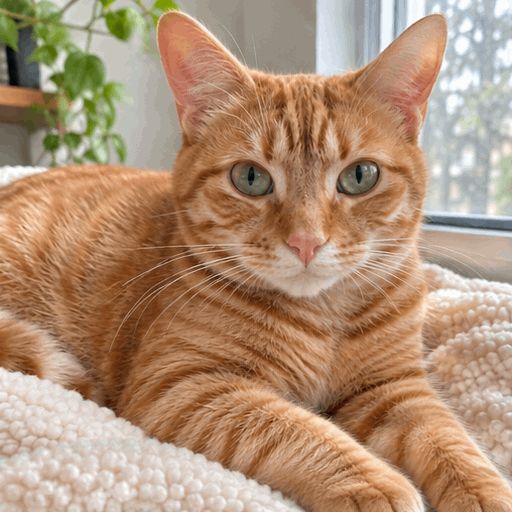
 Photo
A slow blink
The cat blinks slowly and flicks its ear.

 Photo
An old photo
The couple turn to each other and smile.

 Photo
A product shot
Steam rises gently from the coffee.
Ideas for your first GIF
Use your free GIF on the photo you care about most. Copy a prompt, or tap one in the maker above.
Wave hello
A friend or yourself, for a group chat.
Waves hello at the camera and smiles.
A pet
Small motions like a blink suit cats and dogs.
The cat blinks slowly and flicks its ear.
An old photo
Two people in a family print turning to each other.
The couple turn to each other and smile.
A product
Steam, a spin or a shine for something you sell.
Steam rises gently from the coffee.
How paying once works here
Make your free GIF
Your first GIF is free and needs no account. See the result before you spend anything.
Buy one pack
Sign in with Google and pick 10, 30 or 100 credits. You pay once at checkout; there is no plan to cancel.
Use credits as you go
Each GIF takes one credit from your balance, this week or months later, until the credits run out or expire.
It all happens in our photo to GIF maker. Weighing it against MyHeritage? See our Deep Nostalgia alternative page.
Getting the most from your credits
- Start with the small pack
- If you only need a few GIFs, the 10-credit pack is enough. You can buy another pack whenever you like.
- Use a clear photo
- One or two subjects that are easy to see give better first tries, so fewer credits go on retries.
- Keep the motion small
- A blink, a wave or a smile works more often than several actions in one loop.
When a pay-once pack is not the right fit
- You want video
- One photo makes one square GIF of about a second, with no sound. For longer clips or talking faces, a video tool suits you better.
- You will not use them within a year
- Credits expire 365 days after purchase. If you need one GIF a year, the free GIF and the smallest pack may be all you need.
- You want the exact face every time
- The AI redraws every frame, so faces and details can change a little. Try your free GIF first to see if the results suit you.
How some other photo to GIF tools charge
Each of these also turns a photo into a GIF. Checked on their own sites on 14 November 2026; plans change, so check before you pay.
- GifMuse
- A free account gets one free generation a day, and free GIFs are watermarked; Premium is a monthly plan.
- PixiFixi
- A web app with one-click motions such as smile and blink. It is paid with credits rather than a subscription.
- OpenArt
- A bigger AI art site with a GIF generator. New accounts start with free credits; paid plans add monthly credits.
Questions about paying once
Is there a photo to GIF animator where I pay once instead of a monthly subscription?
Yes. Photo to GIF (phototogif.app) sells one-time credit packs, not subscriptions. Your first GIF is free and needs no account; after that, one-time credit packs start at $9.90 for 10, and one credit makes one GIF, with no subscription. See pricing
Will I be charged again later?
No. Each pack is a single payment and nothing renews. You only pay again if you choose to buy another pack.
Do my credits expire?
Yes. Credits expire 365 days after purchase. Each pack shows its expiry on the pricing page.
Can I try it before I pay?
Yes. Your first GIF is free and needs no account. Upload a photo, type a motion and download the GIF.
Do I need an app?
No. It runs in the browser on your phone or computer. To buy credits you sign in with Google.
What happens if a GIF fails?
Failed GIFs are refunded, up to 2 a day.
Try it before you buy anything
Your first GIF shows you what a credit gets you.
Make my GIF